A year ago, "free AI video tool" essentially meant a watermarked clip, five seconds long, that looked like it was filmed through a fever dream. That has changed. Several tools have meaningfully improved their free tiers in 2026, and the gap between free and paid has narrowed enough that a lot of content creators, small business owners, and solo marketers can get genuinely useful output without opening their wallets.
That said, "free" still means limits. Credits run out. Resolution gets capped. Some features are locked. The question isn't just which tool produces the best video — it's which tool's free tier gives you the most useful output for your actual use case before hitting a wall. Those two questions sometimes have different answers, and this review addresses both.
Kling AI wins as the best free AI video tool in 2026 for most users. InVideo AI is the better pick if you need a finished, edited video rather than raw AI-generated footage.
- Best overall free tool: Kling AI — generous credits, good motion quality, no watermark
- Best for complete video creation: InVideo AI — text to full video with voiceover
- Best for short creative clips: Pika Labs — fastest generation, good for social content
- Best free tier for film-quality output: Runway — but credits run out very fast
- Best for editing AI video you've already made: CapCut AI — excellent free editing features
01The Quick Answer
If you're in a hurry: download Kling AI. It has the best free tier right now for actual video generation — a reasonable number of monthly credits, decent quality clips up to five seconds without a watermark, and a straightforward interface that doesn't require a tutorial to figure out. If you need a full video with narration, text overlays, and editing — not just a short generated clip — try InVideo AI instead. Its free tier puts everything in one place and is genuinely useful for faceless YouTube content or social media videos.
The tool that's right for you depends on what you're actually making. We go through each one in detail below so you can match the tool to your use case rather than just picking the most-mentioned name.
02Where AI Video Actually Stands in 2026
It's worth being honest about where AI video generation actually is before reviewing individual tools, because the hype often runs ahead of the reality. Text-to-video has improved dramatically — coherence, motion smoothness, and visual quality are all genuinely better than a year ago. But there are still limitations that affect every free tool on this list.
Longer clips still struggle with consistency. A character's face will shift between shots. Objects appear and disappear. Hands and fine text remain notoriously difficult. The tools that handle these best right now are the paid tiers of platforms like Sora and Pika, not the free versions. What free tiers do well is short, atmospheric, or abstract video — B-roll for YouTube, social content loops, product showcase clips, explainer animations. For that kind of use, the free tools in 2026 are genuinely capable.

03Kling AI — Best Overall Free Tool
Kling AI is a Chinese-developed video generation model that quietly became the best free option in 2026. It generates five-second clips at solid quality with more monthly credits than most competitors, and the free tier output does not include a watermark — which makes it actually usable for content without immediately upgrading.
- No watermark on free tier
- More credits than competitors
- Good motion coherence
- Image-to-video supported
- Interface not as polished as western tools
- 720p cap on free
- Queue waits during peak hours
What sets Kling apart on the free tier is the combination of no watermark and enough monthly credits to actually produce content rather than just test the tool twice. For anyone building a social media presence or creating YouTube B-roll, that is the difference between a tool you'll use regularly and one you abandon after a week.
04InVideo AI — Best for Text-to-Finished Video
InVideo AI takes a different approach to the other tools here. Instead of generating raw video from a prompt, it creates a complete, edited video with voiceover, stock footage, music, and subtitles from a text description or script. If you want a finished YouTube video rather than a clip to edit yourself, this is the most practical free option.
- Full video from one text prompt
- Built-in AI voiceover and subtitles
- Stock footage library included
- Easy editing interface
- Watermark on free videos
- Only 4 exports per week free
- Not pure AI generation — uses stock clips
The watermark is the main barrier on InVideo's free tier. For testing and private use it's fine, but for publishing content you'll want to export watermark-free, which requires upgrading. The four free exports per week is also limiting if you're producing content consistently. That said, for someone who wants to see how a fully narrated, edited video comes together from a script — InVideo is the most impressive demonstration of what AI video can do end-to-end.
05Pika Labs — Best for Short Social Clips
Pika is fast, easy to use, and consistently produces the most polished-looking short clips of any tool at this tier. Its strength is in generating stylised, cinematic short clips that work well for social media — not in long-form or documentary realism. If your goal is striking content for Instagram Reels or TikTok, Pika is worth a serious look.
- No watermark on free clips
- Excellent visual style controls
- Great for social content
- Fast generation
- Daily credit limit is low
- Clips are short (3–5 sec)
- Less realistic motion than Kling
06Runway — Best Quality, But Credits Disappear Fast
Runway produces some of the most impressive AI video output available — but the free tier is genuinely restrictive. You get a small number of credits to start, they deplete quickly, and the watermark appears on free exports. Where Runway earns its place is in the breadth of tools — not just text-to-video, but also image-to-video, inpainting, rotoscoping, and a full AI editing suite.
- Best pure video quality
- Broad AI editing tools
- Strong motion control
- Professional-grade output
- Free credits extremely limited
- Watermark on all free exports
- Expensive to upgrade
07CapCut AI — Best Free Editor for AI Video
CapCut is less of a pure video generator and more of an AI-powered editing platform. But in 2026, its AI features have grown significantly — auto-captioning, AI background removal, text-to-video templates, and smart scene trimming are all on the free tier. If you're generating clips with Kling or Pika and need to edit, add captions, and export cleanly, CapCut is the strongest free companion tool.
- Best free AI editing suite
- No watermark on exports
- Strong auto-caption AI
- Works on mobile
- Not a pure video generator
- Privacy concerns for some users
- Template output looks similar across creators
The Workflow That Gets the Most From Free Tools
Generate clips in Kling or Pika (no watermark, reasonable free credits), then import into CapCut to add captions, transitions, music, and export cleanly. That combination gives you a complete, publishable video workflow without spending anything — and the output looks considerably more polished than using either tool alone.
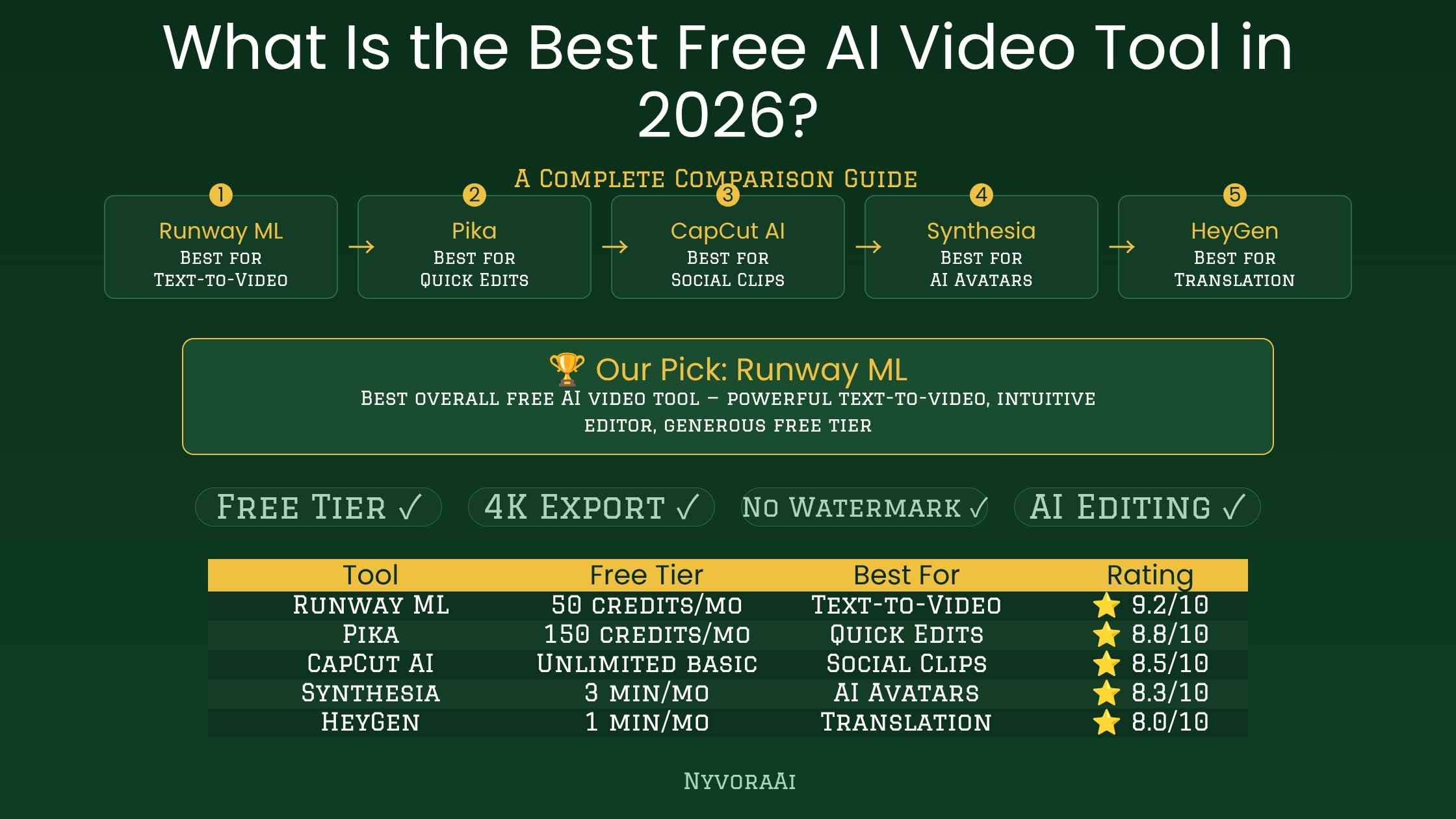
08Full Comparison Table
| Tool | Best For | Free Credits | Watermark | Max Length | Quality |
|---|---|---|---|---|---|
| Kling AI | General video gen | Generous | None | 5–10 sec | Very good |
| InVideo AI | Full video with voice | 4/week | Yes | 15 min | Good |
| Pika Labs | Social clips | Daily limited | None | 3–5 sec | Very good |
| Runway | Highest quality | Very low | Yes | 4–16 sec | Excellent |
| CapCut AI | Editing AI clips | Generous | None | No gen limit | Editor, not gen |
09How to Choose the Right One for You
The right tool depends almost entirely on what you're trying to make. If you're producing short clips for Instagram, TikTok, or YouTube Shorts — pick Kling for generation and CapCut for editing. If you're running a faceless YouTube channel and need a complete narrated video from a script — InVideo AI handles the whole pipeline. If you need the highest-quality output for a specific professional use case and can live with very limited free generations — Runway is worth trying.
What none of these tools replace is original thinking about what you're making and why. The AI handles the production mechanics. The content strategy, topic selection, and audience understanding are still yours to do. The tools in the wider AI content ecosystem — for writing, research, and distribution — pair well with AI video generation. If you're building a comparison perspective on AI tools more broadly, our reviews on whether Perplexity AI is good for research, what Jasper AI is and whether it's worth buying, and whether Grammarly AI is good for writers cover the writing and research side of the AI toolkit that works alongside video.
For anyone producing video content that includes voiceover or spoken content, transcription accuracy matters too — our guide on the best AI tool for transcription covers which tools handle that well. And for those comparing image generation tools alongside video — whether Midjourney is worth subscribing to in 2026 is a useful companion read. If you're also evaluating AI writing tools for content alongside video, our comparison of Copy.ai versus Jasper covers that overlap.
10Frequently Asked Questions
What is the best free AI video tool in 2026?
Can you make professional videos with free AI tools?
Do free AI video tools add watermarks?
How long does AI video generation take?
Is free AI video generation good enough for YouTube?
11Conclusion
The best free AI video tool in 2026 is Kling AI for most use cases — it gives you the most useful output per free credit, skips the watermark, and produces clips that are good enough to publish without immediately feeling like you need to upgrade. If you pair it with CapCut for editing, you have a complete, cost-free video workflow that would have cost real money to assemble just a year ago.
That said, no tool works without a clear plan for what you're making and who it's for. AI video generation removes the technical barrier to creating video content. It does not remove the creative and strategic thinking that makes content worth watching. The tools are better than they have ever been. The question of what to make with them — and why someone would care — is still entirely yours to answer.

Written by Varun Lalwani
Varun reviews AI tools for NyvoraAI with a focus on practical usability and honest limits. This comparison was tested in June 2026 across real content projects. Questions about which AI video tool is right for you? Contact us — we're happy to help.