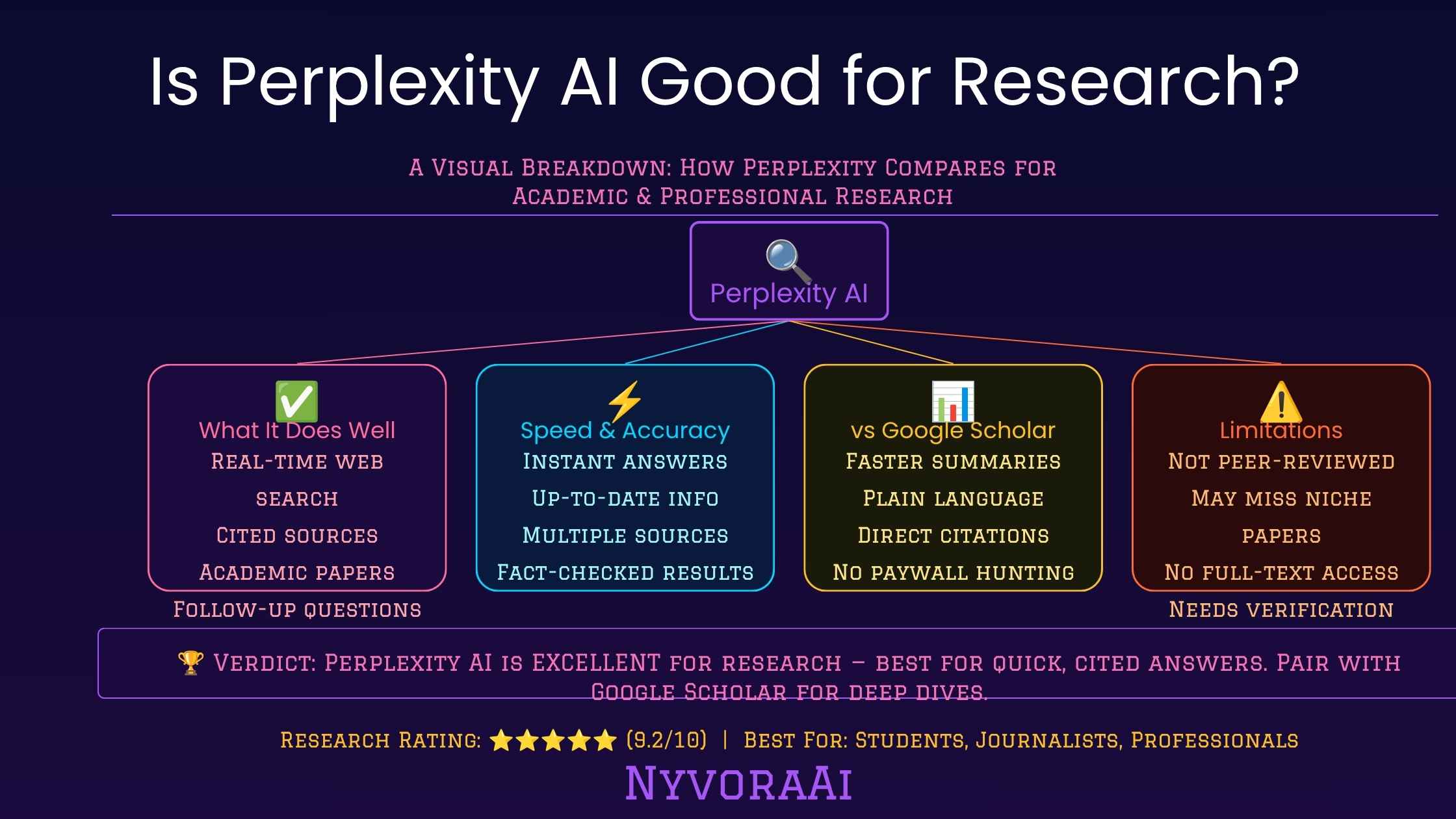
Short answer first, since that's what most people actually want: yes, Perplexity AI is good for research, but only for a specific kind of research. It's excellent at fast, cited, general-purpose fact-finding. It's not a replacement for a real academic literature review, and it's not going to catch every subtle error just because it shows you a source link. The rest of this guide breaks down exactly where that line sits, so you're not guessing.
If you're weighing Perplexity against other AI tools in your workflow, it's worth reading how it fits alongside writing-focused assistants too. We've separately covered whether Claude AI is better than ChatGPT for writing, which is a useful companion read if research is only one part of what you're trying to get an AI to help with.
Perplexity AI is a research accelerator, not a research replacement.
- For quick, cited answers: Perplexity is faster and more transparent than a typical chatbot, since every claim links back to a source.
- For academic depth: It's a starting point, not a substitute for Google Scholar or a university database, because it can't reach most paywalled journals.
- For accuracy: Citations reduce hallucination risk but don't eliminate it. Always click through and verify anything that matters.
- For everyday use: The free tier alone is genuinely useful for students, writers, and anyone doing preliminary research before a bigger project.
01What Is Perplexity AI, Exactly?
Perplexity AI is often described as an "answer engine," which is a fair way to put it. Instead of returning a list of blue links like a traditional search engine, it reads across multiple live web sources in real time, synthesizes a direct answer, and shows you exactly which sources it pulled from, usually as small numbered citations you can click straight through to. The idea is to remove the step where you open ten tabs, skim each one, and mentally stitch together an answer yourself.
Under the hood, Perplexity isn't a single model. It routes queries through a combination of its own in-house "Sonar" models and, depending on your plan, access to other large language models for more complex reasoning. That matters for research specifically, because the quality of the final answer depends on two separate things working well together: how good the underlying model's reasoning is, and how good the retrieval step is at finding relevant, current, trustworthy sources in the first place.
It launched as a smaller player but has grown into a genuinely mainstream research tool by 2026, partly because search-driven AI has become the expected way people look things up, and partly because it solved a real problem: chatbots that answer confidently without showing their work.
02How Perplexity Actually Handles a Research Query
When you type a question into Perplexity, it doesn't just generate an answer from what a model already "knows." It runs a live search across the web first, pulls in a set of relevant pages, reads through them, and then writes a synthesized answer grounded in what those pages actually say. Every sentence that draws from a specific source gets a small citation marker, so you can trace any claim back to where it came from.
This is the single biggest difference between Perplexity and a standard chatbot answering from memory. A model with no live retrieval step can sound completely confident about something that's outdated, wrong, or simply invented. Perplexity's grounding in current web sources doesn't make it infallible, but it does make its answers checkable, which is the property that actually matters for research work.
Perplexity also offers Focus modes, which narrow the search to a specific type of source. The Academic focus mode restricts results to scholarly and research-oriented sources, which is genuinely useful when you want to skip marketing blogs and content farms entirely. There's also a Writing mode that reduces web search to lean on the model's own reasoning, and a few others depending on what you're trying to do. Knowing which mode you're in matters more than most users realize, because it directly changes what kind of sources feed into your answer.
Why Citations Aren't the Same as Verification
A citation tells you where a claim came from. It doesn't tell you the claim is correct. Perplexity can occasionally summarize a source in a way that overstates or slightly misreads what that source actually says, which is easy to miss if you never click through. Treat every citation as a starting point for your own quick check, not as proof the answer is airtight.
03Where Perplexity Genuinely Helps Researchers
This is Perplexity's entire reason for existing, and it delivers. Ask about something that happened last week, a recent statistic, or a fast-moving topic, and you get a synthesized answer with sources attached, in seconds, instead of having to manually search and cross-reference multiple pages yourself.
Switching to Academic focus filters results toward research papers, journals, and scholarly repositories instead of general web content. It won't unlock paywalled full-text papers, but it's a genuinely useful way to get a first pass at what the published literature says on a topic before you dig into a proper database.
Perplexity's "Spaces" feature lets you group related searches, uploaded files, and notes into one persistent workspace. For anyone juggling a multi-week research project, that's a meaningfully better experience than starting from a blank chat every time and losing context between sessions.
On paid plans, you can point a research question at different underlying models depending on how much reasoning depth you need. That flexibility is handy when a question needs careful multi-step analysis rather than a quick fact lookup.
04Where Perplexity Falls Short
None of this makes Perplexity a flawless research tool, and it's worth being direct about the gaps. The most important one is paywall access. A huge portion of serious academic research sits behind journal paywalls that Perplexity simply cannot read, which means its "Academic" answers are often built from abstracts, summaries, and open-access papers rather than full texts. For a real literature review, that's a meaningful limitation.
The second issue is synthesis errors. Because Perplexity is summarizing multiple sources into one answer, it can occasionally blend details in a way that isn't quite accurate to any single source, especially on topics where sources genuinely disagree. The citation is right there, but the synthesis on top of it can still drift.
Third, source quality varies by query. Ask a well-covered topic and you'll get strong, reputable sources. Ask something niche or freshly published, and Perplexity may lean on thinner sources simply because better ones haven't been indexed yet, or don't exist publicly. It's only as good as what the open web currently offers on that specific question.
Finally, the free tier has usage limits on the more capable models, and some of the genuinely powerful research features, like unlimited Pro searches and expanded file uploads, sit behind a paid subscription. That's a reasonable trade-off for heavy users, but worth knowing before you build a workflow around features you might not keep free access to.
05Perplexity vs Google vs ChatGPT vs Google Scholar
The most useful way to think about Perplexity isn't "is it better than Google," it's "what job is each tool actually built for." Here's how they stack up for research specifically.
Best when you want a direct, synthesized, cited answer without doing the reading and cross-referencing yourself. Weakest for exhaustive academic depth and paywalled sources.
Best when you want to see everything available and form your own judgment about which sources to trust. Slower, since you're doing the synthesis manually, but it doesn't filter anything out of your view.
Strong for reasoning through a topic conversationally and iterating on ideas, but without live browsing enabled, it's working from training data rather than the current web, which makes it weaker for anything time-sensitive.
Still the standard for a genuine literature review. It indexes the actual academic record, including work Perplexity can't fully reach, though it won't summarize or explain anything for you the way Perplexity does.
In practice, a lot of working researchers, students, and writers use these tools together rather than picking one. Perplexity for the fast orientation pass, Scholar for the real citations, and a writing-focused assistant for turning findings into a draft. If you're also curious how AI tools compare on the writing side of that pipeline, our guide on Claude AI vs ChatGPT for writing covers that half of the workflow in detail.
06Best Use Cases for Perplexity AI in Research
Students
Fast orientation on unfamiliar topics before diving into assigned readings or a formal literature search.
Journalists
Quick fact-checking and background gathering on breaking stories, with sources attached for verification.
Marketers
Fast competitive and market research summaries with citations you can hand off or double-check.
Developers
Looking up current documentation, comparing tools, or getting oriented on unfamiliar technical topics.
Early academic work
Academic focus mode for a first pass on a topic before a full literature review in a proper database.
Everyday curiosity
Quick, sourced answers to "how does this actually work" questions without wading through SEO content.
07Mistakes People Make When Using AI Search Tools for Research
08Find Out If Perplexity AI Fits Your Research Style
Answer three quick questions and get a straight recommendation on how Perplexity should, or shouldn't, fit into your research process. Still not sure after that? Get in touch with the NyvoraAI team and we'll point you in the right direction.
09Frequently Asked Questions
Is Perplexity AI good for research?
Is Perplexity AI accurate?
Is Perplexity AI better than Google for research?
Can I use Perplexity AI for academic research papers?
Is Perplexity AI free to use?
10Conclusion
So, is Perplexity AI good for research? The honest answer is yes, as long as you're clear-eyed about what kind of research you're actually doing. It's genuinely one of the fastest ways to get a current, sourced, synthesized answer to a general question, and the citation-first approach makes it far more trustworthy than a chatbot answering from memory alone. But it isn't, and isn't trying to be, a replacement for Google Scholar, a university database, or your own careful reading of a primary source when the stakes are high.
The researchers getting the most out of Perplexity in 2026 aren't using it as their only tool. They're using it as the fast first pass, the thing that gets them oriented on a topic in two minutes instead of twenty, and then they bring in more specialized tools when the work demands real rigor. Used that way, it earns its place in a serious research workflow. Used as a single source of truth for anything important, it will eventually let you down, the same way any single tool would.
If you're building out a broader AI toolkit beyond research, it's worth exploring the rest of what's out there too, including how these tools handle creative and visual work in our guide to the best AI image generators in 2026. And since this space moves fast, the NyvoraAI news section is where we track model updates, new features, and anything that changes how these tools perform for research specifically.

Written by Varun Lalwani
Varun covers AI tools, trends, and practical guides at NyvoraAI. This article was reviewed for accuracy in July 2026. Spotted something that's changed or have a tool we should add? Let us know, we update our guides when things shift.