I've spent more time than I'd like to admit sitting with headphones on, rewinding audio clips, and typing out what someone just said. It's slow, it's tedious, and the moment I started testing AI transcription tools properly, I never looked back. The category has come a long way — even in the last year or two, accuracy has improved enough that most transcripts just need a light editing pass rather than a full rewrite.
That said, what is the best AI tool for transcription doesn't have one clean universal answer. A solo podcaster, a sales team logging customer calls, a student capturing lectures, and a journalist working with interview recordings all need fairly different things from a transcription tool. This guide walks through the main options honestly — who they're built for, where they fall short, and which one I'd point someone toward based on their actual situation.
- Whisper (OpenAI) is the strongest free, open-source option with outstanding multilingual support — best if you want accuracy and control without a subscription.
- Otter.ai is the best for live meeting transcription — real-time, integrates with Zoom and Meet, and has a usable free tier.
- Fireflies.ai is best for teams, especially sales and support, with CRM integrations and automated meeting summaries.
- Descript is the best choice for podcasters and video editors who want to edit audio by editing the transcript text.
- No tool is 100% accurate — always do a quick review pass before using transcripts professionally.
01Quick Answer: Best Tool by Use Case
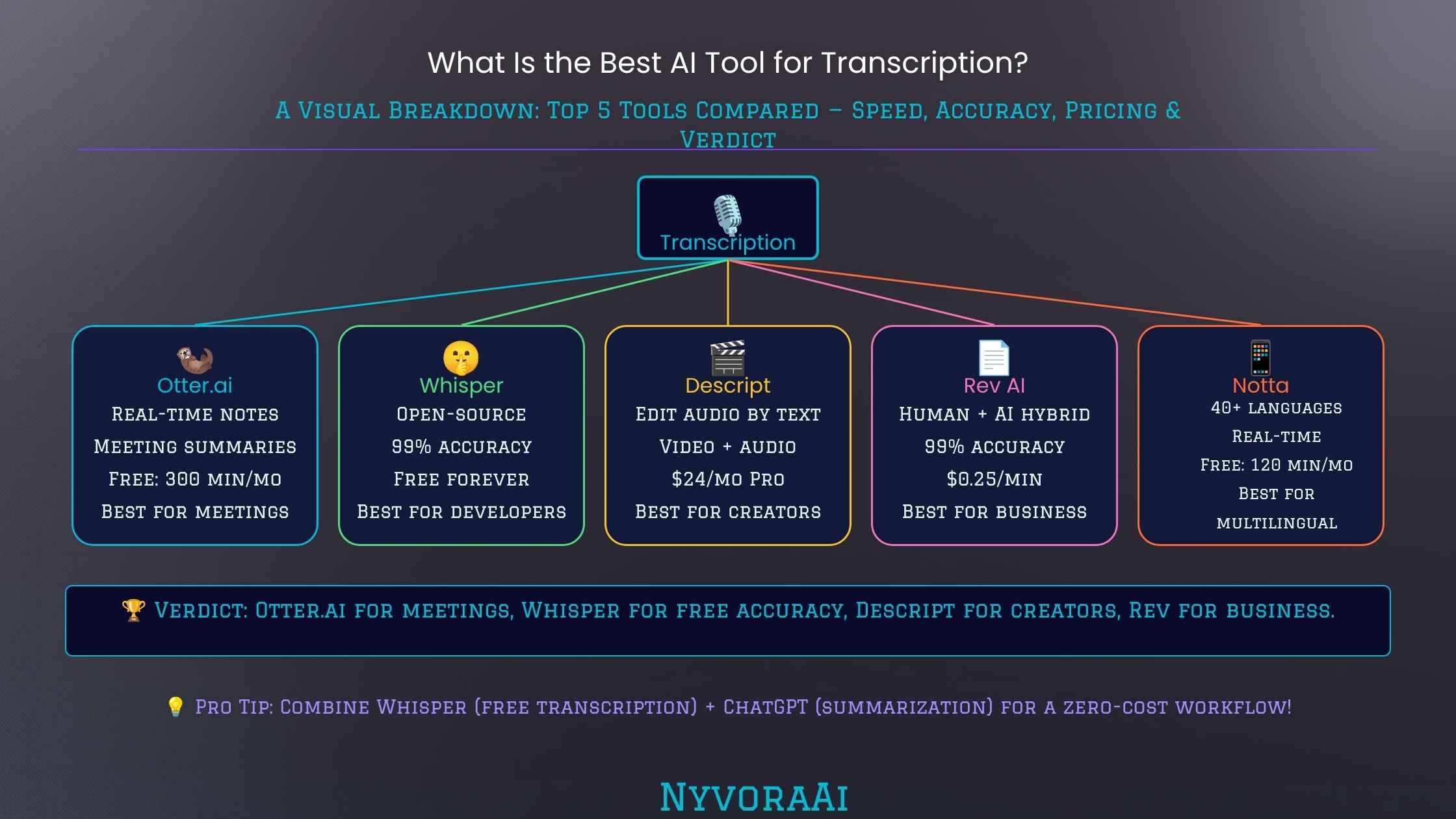
If you're in a hurry, here's the short version. For meetings and real-time transcription, Otter.ai. For podcasts, video editing, and audio cleanup, Descript. For team collaboration, sales calls, and CRM workflows, Fireflies.ai. For high-accuracy offline transcription and multilingual content, OpenAI Whisper. For students on a budget, Otter.ai's free tier or Whisper with a simple UI wrapper.
That said, those short answers miss a lot of nuance. The tool that's technically most accurate isn't always the one that fits your workflow best. Keep reading for the fuller picture on each.
02How AI Transcription Actually Works
Modern AI transcription is built on speech recognition models that have been trained on enormous volumes of audio — across languages, accents, noise environments, and recording qualities. Rather than matching sounds to a fixed phoneme dictionary the way older systems did, they learn statistical patterns in how speech sounds map to words and sentences, which is a big part of why they handle natural, conversational speech so much better than their predecessors.
Most of the top tools are either built directly on OpenAI's Whisper model or use comparable architectures. That underlying model is genuinely impressive — it handles accents, background noise, and multiple languages far better than anything that came before it. The differences between paid tools largely come down to the layer built on top: the meeting integrations, the speaker identification, the summary and action item extraction, the editing interface, and how much of your audio is stored on their servers versus processed locally.
If you're curious about what's happening under the hood in terms of how language models in general process and understand speech and text, our guide on is Perplexity AI good for research also touches on how AI tools are handling language-based tasks more broadly — the fundamentals overlap more than you'd expect.
03Tool-by-Tool Breakdown
Whisper is OpenAI's open-source speech-to-text model, and it's legitimately one of the most accurate transcription engines available — often matching or beating expensive paid services on clean audio. It runs locally on your machine, which means your audio never leaves your device, and it supports over 99 languages. The catch is there's no polished UI out of the box; you're either using the command line or a third-party app built on top of Whisper.
Pros
- Free and open-source — no subscription
- Exceptional accuracy on clean audio
- 99+ language support is best in class
- Runs locally — audio stays on your device
- No usage limits or monthly caps
Cons
- No built-in UI — needs setup
- No real-time transcription
- Speaker diarisation not built in
- Slower on older hardware
Otter.ai has built its reputation almost entirely on meeting transcription, and it's very good at it. It integrates directly with Zoom, Google Meet, and Microsoft Teams, can join meetings automatically as a bot, and provides real-time transcription that participants can follow along with as the conversation happens. The free tier gives 300 minutes per month — enough for a few meetings. It also generates AI summaries and pulls out action items, which makes it useful even after the meeting ends.
Pros
- Real-time transcription during live meetings
- Native integrations with Zoom, Meet, Teams
- Speaker identification works well
- AI summaries and action item extraction
- Useful free tier (300 min/month)
Cons
- Primarily English-focused
- Free tier has minute and export limits
- Accuracy drops with heavy accents or crosstalk
- Meeting bot can feel intrusive to some participants
Fireflies positions itself more as a team intelligence tool than a pure transcription service. Yes, it transcribes meetings — but the real value proposition is everything that happens after: searchable meeting databases, automatic summaries, CRM integrations (Salesforce, HubSpot, and others), and the ability to search across all your past meetings for a specific topic or phrase. For sales teams, support teams, or any organization where meeting content needs to flow into other systems, it's genuinely more useful than Otter.
Pros
- Excellent CRM and workflow integrations
- Searchable archive across all meetings
- Strong team collaboration features
- Conversation intelligence and analytics
- Works across major meeting platforms
Cons
- More expensive than Otter at scale
- Overkill for individual or casual use
- Can feel complex to set up initially
- Summary quality varies with audio quality
Descript approaches transcription from a creative production angle. The core idea — edit your audio or video by editing the text transcript — sounds gimmicky until you actually use it. Delete a word from the transcript and it removes that audio. Cut a paragraph and the corresponding footage is gone. For podcasters, video editors, and content creators who spend hours in editing software, this is a genuinely different way of working. The transcription accuracy is strong, and the filler-word removal (automatically deleting all the "um"s and "uh"s) alone saves hours on longer recordings.
Pros
- Edit audio/video by editing the transcript
- Excellent filler-word removal
- Studio Sound AI noise cleanup is impressive
- Good speaker identification
- Solid free tier for getting started
Cons
- Learning curve if you're used to traditional editors
- Can be slow on long files
- Not designed for real-time or meeting transcription
- Export options can feel limited on the free plan
Rev and Trint take a slightly different approach — both offer automated AI transcription alongside human review options for when accuracy really matters. Rev charges per minute of audio, which makes it economical for occasional use without a subscription. Trint is geared more toward journalists and media organizations, with collaboration and publishing workflow features built in. Both are worth knowing about if you have sporadic, high-stakes transcription needs where you can't afford errors.
Pros
- Pay-per-minute pricing suits occasional users
- Human review option for high-stakes transcripts
- Trint has strong journalist/media workflow features
Cons
- Can get expensive with high volume
- Human review adds turnaround time
- Less feature-rich than Descript or Otter for teams
04Interactive: Find Your Best Transcription Tool
Not sure which one fits your situation? Answer two questions and get a personalised recommendation.
Transcription Tool Finder
Answer these quick questions — takes about 20 seconds
05Head-to-Head Comparison
| Feature | Whisper | Otter.ai | Fireflies | Descript |
|---|---|---|---|---|
| Real-time transcription | ❌ | ✅ | ✅ | ❌ |
| Free tier | ✅ Fully free | ✅ 300 min/mo | ⚠️ Limited trial | ✅ Basic tier |
| Speaker identification | ⚠️ Via add-ons | ✅ | ✅ | ✅ |
| Meeting platform integration | ❌ | ✅ Zoom, Meet, Teams | ✅ Most platforms | ❌ |
| Multilingual support | ✅ 99+ languages | ⚠️ Primarily English | ⚠️ Limited | ⚠️ Limited |
| Audio/video editing | ❌ | ❌ | ❌ | ✅ Core feature |
| Privacy (local processing) | ✅ Runs locally | ❌ Cloud-based | ❌ Cloud-based | ❌ Cloud-based |
| CRM integration | ❌ | ⚠️ Limited | ✅ Salesforce, HubSpot | ❌ |
| Starting price | Free | ~$16.99/mo | ~$18/mo/seat | ~$24/mo |
06Accuracy, Limitations, and What Still Goes Wrong
Across all these tools, accuracy on clean, single-speaker audio with a decent microphone is genuinely impressive — often in the 92–96% range, which means relatively few corrections needed. The problems show up in predictable ways, and it's worth knowing what they are before you commit to a tool for anything important.
Multiple Overlapping Speakers
When two people talk at the same time, AI transcription tends to mangle both. Crosstalk in group meetings is the single most common accuracy problem across all tools.
Heavy Accents and Dialects
Tools trained predominantly on standard American or British English still struggle with strong regional accents, though Whisper handles this noticeably better than the meeting-focused tools.
Technical Vocabulary
Medical, legal, and highly specialized terminology gets mangled fairly regularly. Tools either don't know the word or substitute something phonetically similar that's completely wrong in context.
Background Noise
Café recordings, outdoor audio, and phone calls with compression all hurt accuracy considerably. Descript's Studio Sound feature helps here, but it's not magic on very poor source material.
Punctuation and Formatting
Even accurate word transcription can produce hard-to-read output because the AI places commas and full stops based on statistical patterns, not actual understanding of where thoughts end.
Fast Speakers
People who speak very quickly, particularly in casual conversation, produce more errors across all tools. Slowing down slightly, or using a directional microphone, helps more than switching tools.
The 90-Second Review Rule
Whatever tool you use, build in a 90-second skim of the output before sending it anywhere. AI transcription errors are usually concentrated around proper nouns, technical terms, and the moments when multiple people talk at once — those are the spots worth scanning first.
07Tips for Getting Better Results From Any Transcription Tool
The tool matters, but audio quality matters more. A mediocre recording through a good tool will usually produce worse output than a great recording through a mediocre tool. A few habits make a real difference:
- Record closer to the microphone — even phone recordings improve dramatically when you're six inches away rather than two feet.
- Minimize background noise — close doors, mute keyboards, turn off fans during any recording you plan to transcribe seriously.
- One person at a time — if you have any control over the conversation format, avoiding crosstalk dramatically improves speaker labelling and accuracy.
- Use chapter or section markers — tools like Descript and Otter let you add markers during recording that make editing faster afterwards.
- Don't skip the review — AI transcription is fast enough that "just publish the raw output" is tempting. It's almost always worth the extra few minutes to scan for errors, especially for anything going to an audience.
If you're a student using these tools for lectures or study materials, our guide on which AI tool is best for students covers transcription alongside the broader set of AI tools that are actually useful in an academic context. And if you're building transcription into a wider content workflow — using the transcript to write articles or social posts — you might also find our comparisons of writing-focused tools useful. We've looked at both whether Claude AI is better than ChatGPT for writing and what Jasper AI is and whether it's worth buying if your work extends beyond transcription into longer-form content production.
It's also worth mentioning that if your transcription needs sit inside a broader AI research or content workflow, having the right tools for each stage makes a real difference — the same way choosing the right image generator matters for visual content. Our roundup of the best AI image generators in 2026 follows the same format as this guide if you need to fill that part of your toolkit too.
08Frequently Asked Questions
What is the best AI tool for transcription?
Is AI transcription accurate enough to use professionally?
What is the best free AI transcription tool?
Can AI transcription tools handle multiple speakers?
Which AI transcription tool is best for meetings?
How much does AI transcription cost?
Can AI transcription tools work in languages other than English?
The honest conclusion here is that there's no single best AI transcription tool — there are several genuinely good ones, each built with a specific workflow in mind. If you're sitting in meetings all day, Otter.ai will probably change your life. If you produce audio or video content, Descript is worth the learning curve. If you transcribe audio files, care about privacy, or need multilingual support without a subscription, Whisper is hard to beat. And if you're running a team where meeting content needs to flow into CRM records and searchable archives, Fireflies is built exactly for you. Pick the one that matches how you actually work, run a small test with your real audio, and go from there.

Written by Varun Lalwani
Varun tests and writes about AI tools with a focus on what actually works in real workflows — not just what looks good in a demo. Questions? Get in touch here.