I've used Grammarly on and off for years — first as a student trying to survive essay deadlines, then as a content writer trying to survive editors, and now as someone who tests writing tools for a living. So when people ask if Grammarly AI is good for writers, I don't give a marketing answer. I give the one I'd give a friend over coffee: it depends on what kind of writing you do, and how much you lean on it.
What's changed is how much artificial intelligence now sits under that little squiggly line we all learned to trust. In 2026, Grammarly isn't just catching typos — it's rewriting sentences, adjusting tone, and generating entire paragraphs on request. This review breaks down what it actually does well, where it quietly falls short, what it costs, and who genuinely gets value from it.
If you're also weighing generative tools for drafting content from scratch rather than just editing it, our Claude AI versus ChatGPT for writing comparison is a useful companion read, since Grammarly and those tools solve different halves of the same problem.
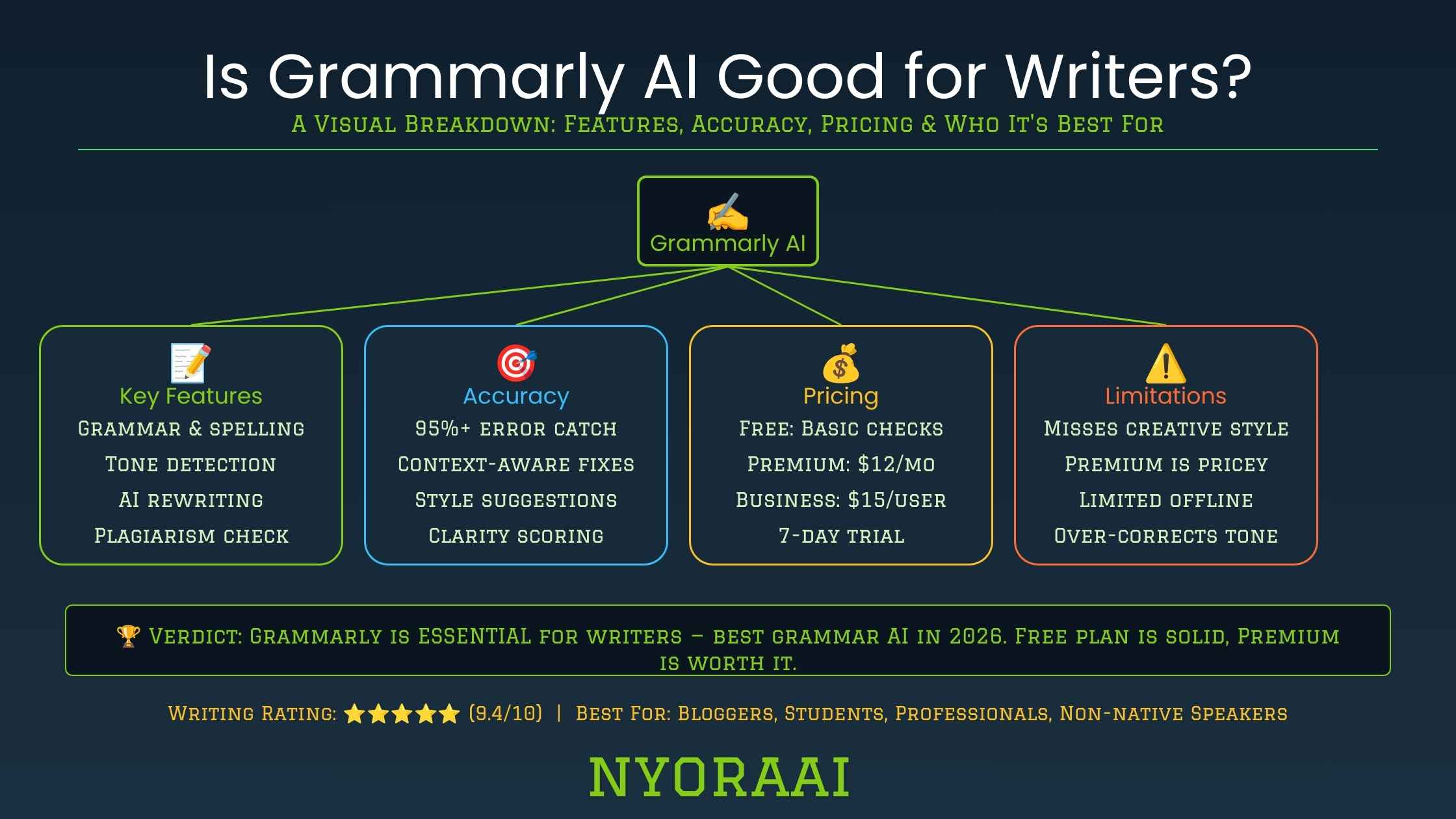
Grammarly AI is a strong daily editing layer — not a full replacement for thinking through your own writing.
- Grammar and spelling checks remain rock solid — the foundation the whole product is built on
- Tone detection and generative rewrites are genuinely useful but need supervision, not blind trust
- It can flatten your personal voice if you accept every suggestion without reading it
- It's not a substitute for developmental editing — it won't judge whether your argument or story actually works
- Best used as a final pass, layered with a generative tool for drafting and your own read-aloud check
01Quick Answer
Yes, Grammarly AI is good for most writers as a daily editing companion. It reliably catches grammar, spelling, and punctuation mistakes, and its AI layer adds useful tone detection and sentence rewrites on top of that foundation. It's worth using if you write emails, blog posts, essays, or client-facing content regularly and want a fast second set of eyes. It's not a good fit as your only editing step for high-stakes writing — fiction manuscripts, dissertations, or anything where structure and voice matter more than surface polish — because it can't judge whether your argument holds together or your story actually works. For that kind of writing, treat Grammarly as a supporting layer, not a replacement for a human editor.
02What Grammarly AI Actually Is
Grammarly started as a grammar and spell-checking browser extension. Today it's better described as an AI writing assistant that lives everywhere you type: your browser, email client, Google Docs, Microsoft Word, Slack, and its own standalone editor. The "AI" part comes from a large language model working alongside Grammarly's older rule-based grammar engine, and that combination matters more than it sounds.
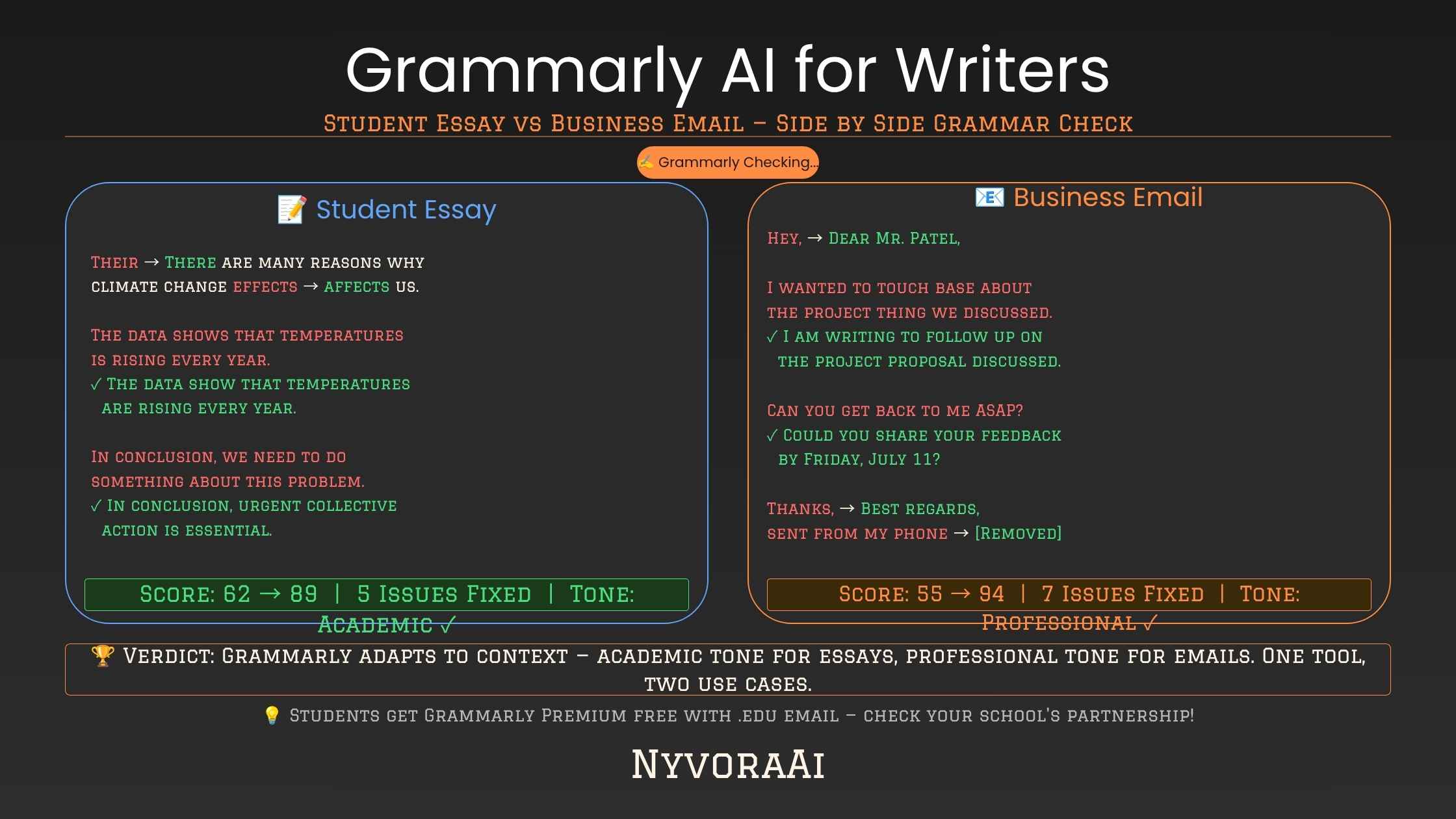
The rule-based side is what reliably catches subject-verb agreement, misplaced commas, and spelling mistakes — the boring but essential stuff. The AI layer handles the fuzzier tasks: rewriting a clunky sentence, softening a blunt email, or suggesting a more confident way to phrase a pitch. Together, they make Grammarly feel less like a red-squiggly-line tool and more like an editor sitting quietly next to you while you type.
There's also a personalization layer a lot of people never turn on. Grammarly lets you set goals for a document — audience, formality, domain, and intent — before you start writing, and suggestions shift based on those settings. A cover letter set to "formal" and "persuasive" gets different tone feedback than the same words set to "casual" and "informative." Skipping this step is the single biggest reason people feel like Grammarly's suggestions don't match what they were trying to say.
03Key Features, Broken Down
04Grammarly AI Pricing in 2026
| Plan | Best For | What You Get |
|---|---|---|
| Free | Casual writers | Basic grammar, spelling, and punctuation checks |
| Premium | Freelancers & students | Tone rewrites, clarity suggestions, plagiarism checker, generative prompts |
| Business | Content teams | Brand voice, style guides, admin controls, team analytics |
Pricing changes periodically, so it's worth checking Grammarly's official site for current numbers before committing to an annual plan. The free tier genuinely covers casual use well; it's the generative and tone features that push most regular writers toward Premium.
05Who Grammarly AI Is Actually Worth It For
Non-native English speakers
Grammarly catches phrasing errors — preposition choice, idiom mismatches — that spellcheck alone never flags and careful proofreading often misses.
Students under deadline pressure
A tool that instantly flags a run-on sentence saves real time compared to reading your own paper for the fifth time at 1 a.m.
Freelance writers and bloggers
Publishing frequently makes small mistakes more likely to slip through, and clients notice typos faster than they notice good structure.
Professionals writing client-facing emails
The tone detector helps you avoid sounding curt or unsure in messages where the wrong tone can cost a deal.
Not a replacement for structural editing
Novelists and researchers protecting a specific voice or argument still need a human editor for the parts Grammarly can't judge.
If you're a student specifically, it's worth comparing Grammarly against other AI options built for coursework. Our full breakdown of the best AI tool for students goes beyond just grammar checking.
06Grammarly vs Other AI Writing Tools
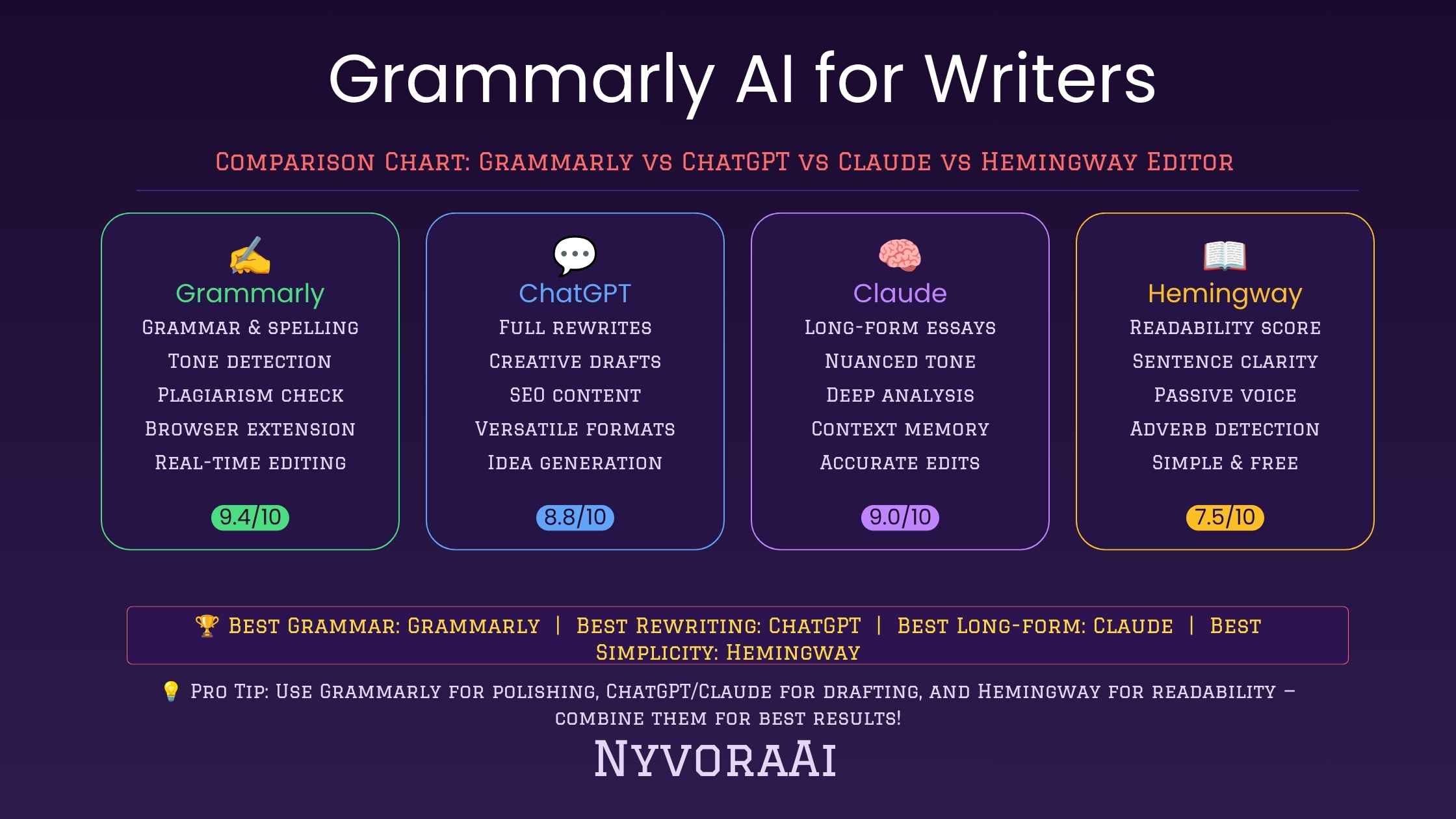
Grammarly is an editor, not a ghostwriter. That's the core difference between it and generative-first tools like ChatGPT or Claude, which are built to draft content from scratch rather than polish something you've already written. If you're deciding between fixing your own draft versus generating one from a prompt, our detailed comparison of Claude AI vs ChatGPT for writing covers which model handles long-form drafting better.
A realistic workflow for a lot of writers in 2026 actually uses both: draft with a generative model, then run the result through Grammarly for polish, tone-checking, and grammar cleanup. Neither tool fully replaces the other. If your writing also depends on visuals — blog headers, social graphics, or illustrations — pairing your written content with the right visual tool matters too. We've reviewed the best AI image generators in 2026 for writers who publish their own content.
07Pros and Cons
- Pro: Reliable line-level corrections. Grammar and spelling checks are consistently accurate and rarely get in the way of your writing flow.
- Pro: Tone detection prevents miscommunication. Catching an accidentally blunt email before you hit send is a genuinely underrated feature.
- Pro: Works almost everywhere you already write, so there's no need to copy-paste into a separate app.
- Con: Can flatten personal voice if you accept every rewrite suggestion without reading it critically.
- Con: Doesn't understand narrative structure or argument logic — it can't tell you if your piece actually makes sense.
- Con: Advanced generative features sit behind a paywall, and overuse can train writers to lean on it instead of learning grammar themselves.
Read Every Rewrite Before Accepting It
Generative suggestions are the part of Grammarly most likely to change your meaning, not just your grammar. Treat them as a first draft of a sentence, not a final answer, especially in writing where precise wording matters.
08How to Get More Out of Grammarly AI
Most of the frustration people have with Grammarly comes down to using it the same way regardless of what they're writing. A few small habit changes make a noticeable difference in how useful the suggestions actually are:
- Review every generative rewrite instead of accepting it blindly
- Set your tone goals manually so suggestions match your actual audience
- Use it as a final pass, not your only editing step
- Turn off suggestions you consistently disagree with to reduce noise
- Pair it with reading your work aloud — Grammarly won't catch awkward rhythm
A Real Workflow Worth Copying
Write your first draft with suggestions turned off entirely, since seeing underlines while you're still figuring out what to say breaks your train of thought. Turn them back on for a grammar pass, then a tone pass, then read the whole thing aloud. That third step catches rhythm problems no AI tool reliably sees.
09Mistakes People Make Using Grammarly
- Accepting every suggestion automatically. Grammarly's rewrites are a starting point, not a verdict — reading them critically protects your voice.
- Never setting document goals. Skipping the audience and tone settings means you're getting generic defaults instead of feedback tuned to your actual writing.
- Treating it as your only editor. It's excellent at line-level polish and blind to structure, argument, and story — those still need human judgment.
- Relying on it to learn grammar passively. Reading why a suggestion was made, not just clicking accept, is what actually improves your writing over time.
- Ignoring the free tier's limits. If you regularly need tone rewrites or plagiarism checks, staying on the free plan just means hitting friction constantly.
10Frequently Asked Questions
Is Grammarly AI good for writers?
Does Grammarly use real AI or just rules?
Is Grammarly AI free to use?
Can Grammarly replace a human editor?
Is Grammarly better than ChatGPT for writing?
11Conclusion
So, is Grammarly AI good for writers? Based on everything above, the honest answer is yes, with limits. It's one of the most reliable tools for catching mistakes, adjusting tone, and tightening sentences without slowing you down. But it works best as a layer in your process, not the whole process. Use it to polish, not to think for you, and your writing stays yours, just cleaner.
If you write regularly, pairing Grammarly with a generative model for drafting and an image tool for visuals rounds out a workflow that covers the entire content creation pipeline, from blank page to published post. Still deciding between generative tools before layering Grammarly on top? Our Claude AI vs ChatGPT for writing comparison and our breakdown of which AI tool is best for students are both good next reads depending on what you're working on.

Written by Varun Lalwani
Varun writes practical, hands-on reviews of AI tools for writers, students, and content creators at NyvoraAI, testing each tool before reviewing it. Updated July 2026. Questions about your setup? Contact us — we're happy to help.