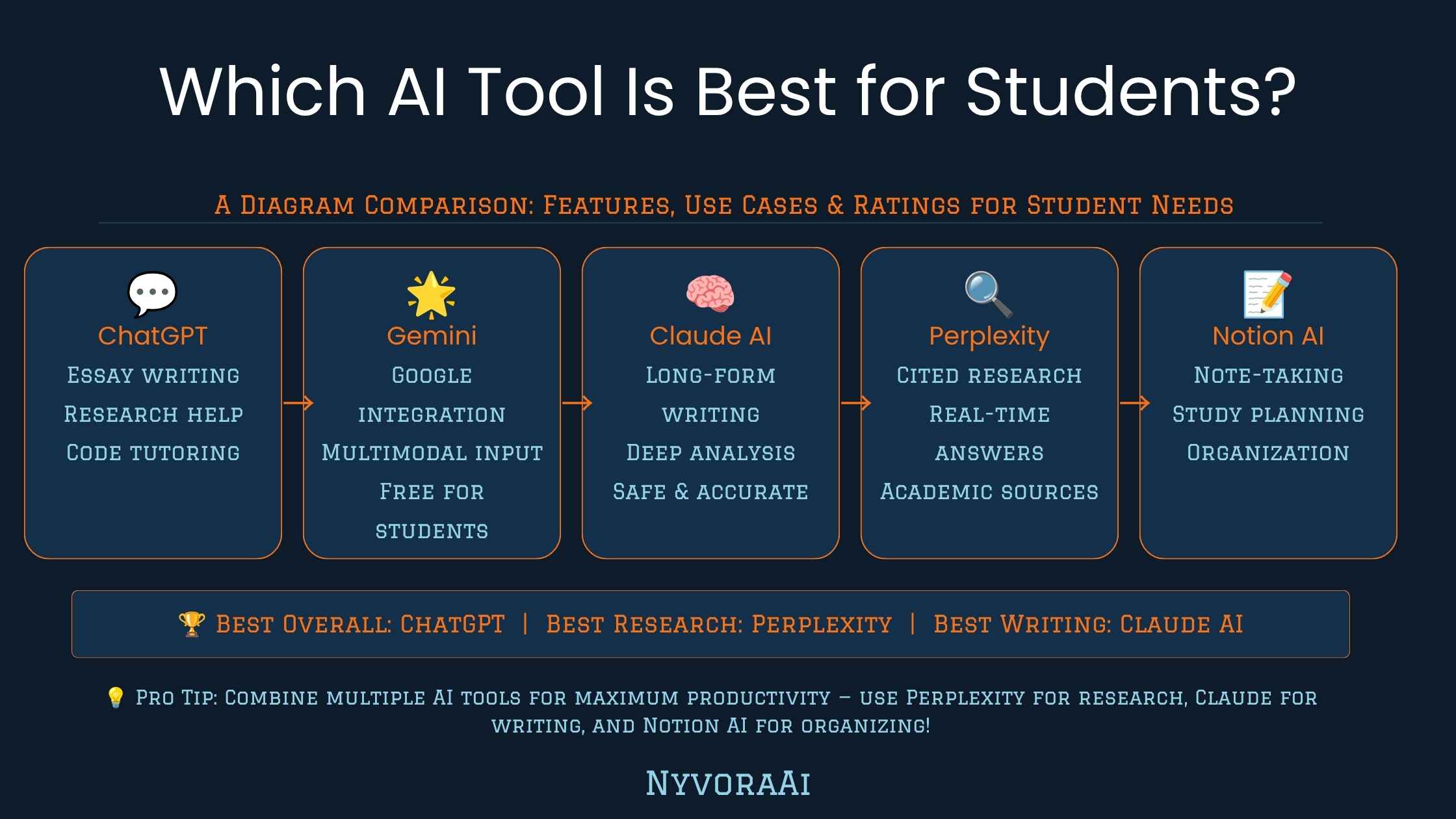
"Which AI tool should I actually use for school" is a question that sounds simple and isn't, mostly because students aren't doing one job — they're writing essays, running lab reports, cramming for exams, debugging code, and building slide decks, often all in the same week. No single app is the best choice for every one of those, and pretending otherwise is how people end up frustrated with a tool that was never built for the task they handed it.
This guide breaks the comparison down by what students actually spend time on, rather than trying to crown one universal favorite. If your workload leans heavily on writing, our detailed Claude AI vs ChatGPT for writing comparison goes deeper into that specific decision than we'll cover here.
The best AI tool for a student depends on the task in front of them, not a single overall ranking.
- ChatGPT and Claude both handle essays, explanations, and study guides well
- Perplexity and NotebookLM-style tools are stronger for research that needs traceable sources
- Specialized math and coding tools outperform general chatbots on step-by-step problem solving
- Free tiers cover most student needs — a paid plan is rarely necessary to get real value
- How you use AI matters as much as which one — transparency with instructors avoids academic integrity issues
01Quick Answer
There's no single AI tool that's best for every student — it depends on the task. For essay writing, explanations, and study guides, Claude and ChatGPT are both strong choices, with Claude often favored for longer, more structured writing and ChatGPT for quick brainstorming. For research that needs real, traceable sources, Perplexity and note-taking tools built around your own documents tend to outperform general chatbots. For math and coding, dedicated tools built specifically for step-by-step problem solving are usually more reliable than a general-purpose assistant. Most students end up using two or three tools rather than just one, matched to the specific kind of work in front of them.
02Why the Answer Depends on Your Workload
A pre-med student running through anatomy flashcards, an English major workshopping a thesis statement, and a computer science student debugging a recursive function are all "students using AI," but they need almost entirely different capabilities. General-purpose chatbots are genuinely good at a wide range of tasks, but specialized tools built for one job — citation tracking, math step-solving, flashcard generation — usually beat a generalist at that one specific job.
The practical takeaway is to stop looking for "the best AI for students" as a single product and start matching tools to task categories instead. Most students who get real, consistent value from AI keep two or three tools in rotation rather than trying to force one app to do everything.
03Best AI Tools by Student Task
04Side-by-Side: AI Tools for Student Tasks
| Tool | Best Student Use | Strength | Free Tier |
|---|---|---|---|
| Claude | Long essays, editing, tone-consistent writing | Holds structure and voice across long documents | Yes |
| ChatGPT | Brainstorming, quick explanations, general Q&A | Fast, flexible, wide plugin support | Yes |
| Perplexity | Research with real sources | Shows citations directly in every answer | Yes |
| Notebook-style AI | Studying from your own notes and readings | Answers grounded only in the documents you upload | Yes |
| Math/STEM solver apps | Step-by-step homework problems | Shows full working, not just the final answer | Freemium |
If you only pick one tool to start with, a general assistant like Claude or ChatGPT covers the widest range of everyday tasks. Add a research-specific tool once you're working on anything that needs cited sources, and a dedicated math or coding tool once general chatbot answers stop showing enough of their working for your comfort.
05How to Pick Yours in Five Steps
List your actual weekly tasks
Essays, problem sets, reading summaries, presentations — write down what you really spend time on, not what you assume you'll use AI for.
Match one tool per major task type
A writing assistant, a research tool, and a math or coding helper cover almost every student workload between them.
Start with free tiers only
Test each tool on your real assignments before considering any paid upgrade — most student needs are covered without spending anything.
Check your school's AI policy
Some courses restrict AI use entirely, others encourage it for brainstorming only — know the rule before you rely on any tool for graded work.
Keep it to two or three tools, max
Juggling five different AI apps costs more time than it saves — narrow down to what actually earns a spot in your routine.
06Using AI Without Crossing Academic Lines
The most common mistake students make isn't picking the "wrong" tool — it's using the right tool in a way that creates a real academic integrity problem. Policies vary enormously between schools, instructors, and even individual assignments, so the safest approach is always checking the specific rule for the specific class rather than assuming AI use is either fully banned or fully fine everywhere.
When in Doubt, Disclose
If you're unsure whether using AI for a specific assignment crosses a line, ask your instructor directly before submitting. Being upfront about how you used a tool is far safer for your academic record than guessing wrong and getting flagged after the fact.
A generally safe pattern across most academic integrity policies: using AI to brainstorm ideas, check your understanding of a concept, or get feedback on a draft you wrote yourself is usually fine. Submitting AI-generated text as entirely your own original work, without disclosure, is where most schools draw a hard line.
07Mistakes Students Make With AI Tools
- Using one tool for everything. A single chatbot can't match a dedicated math solver on showing full working, or a citation tool on tracking real sources.
- Never fact-checking anything. AI can produce confidently wrong information — always verify anything that will end up in a graded submission.
- Ignoring the school's AI policy. Assuming a rule from one class applies everywhere is a common and avoidable mistake.
- Paying for a subscription before testing the free tier. Most student workloads are genuinely covered by free plans — upgrade only once you know exactly what extra feature you need.
- Treating AI output as a finished submission. Draft, review, and revise — the same discipline that applies to any writing tool applies here too.
A Habit Worth Building
Before finals or a major assignment period, spend fifteen minutes testing whichever tool you're relying on against a past assignment you already know the right answer for. It's the fastest way to build real trust — or catch a gap — before it matters.
08Frequently Asked Questions
Which AI tool is best for students overall?
Is ChatGPT or Claude better for schoolwork?
Can teachers detect AI-written essays?
What is the best free AI tool for students?
Is it cheating to use AI for homework?
09Conclusion
Which AI tool is best for students? The honest answer is that it's not one tool — it's the right tool for the task in front of you, chosen deliberately rather than defaulting to whichever app your friends happen to be using. A general assistant like Claude or ChatGPT covers most everyday writing and explanation needs. A research-focused tool earns its place once citations matter. A dedicated math or coding tool beats a generalist once you need to see the actual steps, not just a final answer.
Start with one general-purpose assistant, add a specialized tool the moment your workload genuinely needs one, and always check your school's specific rules before leaning on AI for graded work. That approach — matched tools, tested honestly, used transparently — consistently outperforms chasing whichever single app claims to be "the best AI for students" in any given month.
If your workload is writing-heavy, our deeper comparison of Claude AI versus ChatGPT for writing is worth reading next, and if you're building a presentation or need visuals for a project, the best AI image generators of 2026 roundup covers that specific need in more detail.

Written by Varun Lalwani
Varun writes practical, beginner-friendly guides on AI tools and business workflows for NyvoraAI. Updated July 2026 based on hands-on testing of leading AI tools across common student workloads. Questions about your setup? Contact us — we're happy to help.