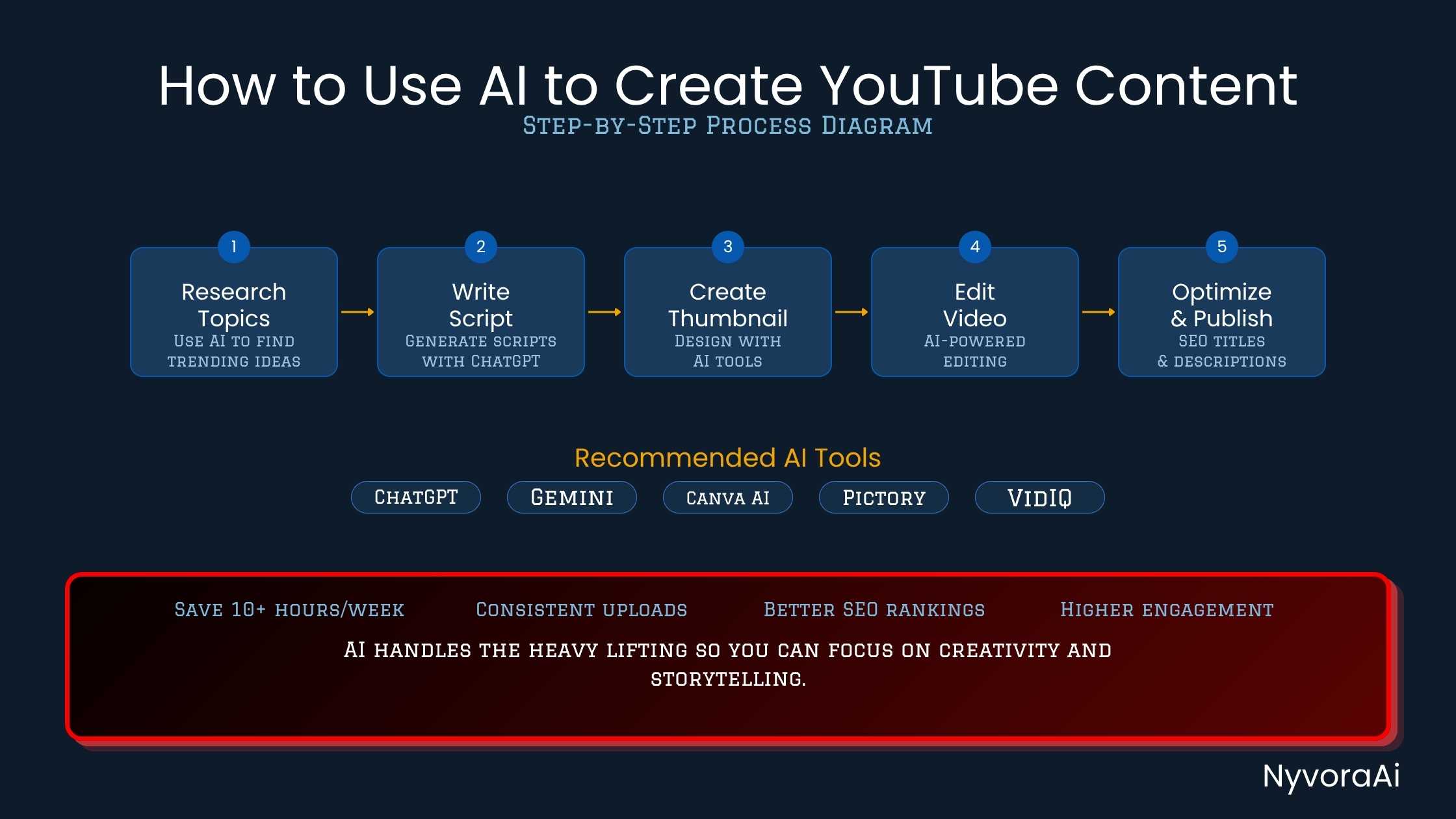
Let me be straight with you about something. I have been making content long enough to know that the bottleneck is almost never the camera or the editing software. It's the hours before you ever hit record, staring at a blank document, trying to come up with a good idea, research it properly, write a script that doesn't sound robotic, and then figure out what on earth to put on the thumbnail. That's where most creators lose momentum.
AI doesn't replace your voice, your face, or the reason people subscribed to you. But it does an excellent job of attacking that pre-production bottleneck. In this guide, I'll walk you through exactly how to use AI to create YouTube content at every stage of your workflow, from the spark of an idea to the moment you hit publish, using tools that are available right now and won't break a small creator's budget.
If you're also writing blog posts or doing social media alongside your YouTube channel, check out our guides on how to use AI to write blog posts faster and the step-by-step guide to using AI for social media, because a lot of what you'll learn here transfers directly.
- AI covers the full pipeline: idea generation, research, scripting, voiceover, thumbnail design, and YouTube SEO can all be assisted by AI tools available today.
- Your voice still wins: the best AI-assisted videos feel personal because the creator edited and personalized the AI draft, not because the AI wrote everything from scratch.
- Save 2-4 hours per video: scripting and research alone typically eat 60-120 minutes by hand; AI cuts this to 10-20 minutes of prompting and editing.
- Prompting quality matters: vague prompts give generic output; specific prompts with your niche, audience, and tone baked in give usable first drafts.
- Always fact-check: AI is confident even when wrong, never publish AI-generated claims without verifying them against reliable sources.
01Why AI and YouTube Are a Natural Fit
YouTube is a volume game in many niches. Channels that post consistently, with well-optimized titles and useful content, tend to compound over time. The problem is that producing even one solid 10-minute video the traditional way, researching, scripting, filming, editing, writing descriptions, designing a thumbnail, requires a full work day. For creators running their channel alongside a job or other responsibilities, that pace is brutal.
AI fits here because it's fast at exactly the things that are slow for humans: writing first drafts, generating lists of ideas, summarizing research, proposing thumbnail copy, and suggesting keyword-rich titles and descriptions. These aren't the creative decisions that define your channel, they're the mechanical groundwork that everything else builds on. Handing that groundwork to AI doesn't make your channel less authentic. It actually does the opposite: when you're not burned out from writing script number eight, you show up on camera with more energy.
The workflow I'll describe below treats AI as a skilled assistant who does the prep work, not as a ghostwriter who replaces you entirely.
02Step 1 — Finding Ideas & Doing Research Faster
Great YouTube videos start with ideas that have both audience interest and search volume. Doing that research manually means jumping between YouTube's autocomplete, Google Trends, competitor channels, and keyword tools for an hour before you even open a document. AI compresses this.
Here's a simple prompt that works well: "I run a YouTube channel about [your niche] for [target audience]. Give me 15 video ideas that would work well as search-driven content in 2026. For each idea, suggest a click-worthy title and a one-sentence hook for the opening." A good AI tool will return a usable list in under a minute. From there, you pick the two or three ideas that feel right, then use a follow-up prompt to go deeper on research.
For the research phase, prompt the AI to summarize what's currently being said on a topic, then cross-check those claims against your own sources. This is important: AI doesn't guarantee accuracy, it reflects patterns in its training data. If you're making a video with factual claims, treat AI summaries as a starting-point scaffold and verify specifics independently. Our guide on how to fact-check AI-generated content walks through a reliable process for doing this before you publish.
Better Prompts = Better Ideas
The more specific your prompt, the better the output. Always include your niche, target audience, and what style your channel uses (educational, entertaining, comparison-focused, etc.). Vague prompts produce generic results that fit no one. Our full guide on how to write better prompts for AI tools is worth reading before you start your first session.
03Step 2 — Writing Your Script With AI
This is where most creators get the biggest time saving. Writing a 1,500-word YouTube script from scratch can take 90 minutes or more. With AI, you can have a workable first draft in 10 minutes, which you then spend another 15-20 minutes editing into your voice.
The prompt structure that works best is specific and layered. Start with something like: "Write a YouTube script for a 10-minute video titled [your title]. My channel tone is [conversational / professional / enthusiastic]. My audience is [describe them]. Include a strong hook in the first 30 seconds, three main sections, a clear call to action at the end, and timestamps I can use in the description."
When the draft comes back, don't use it as-is. Read through it and replace anything that sounds like it was written by a machine rather than you. Add your personal examples, your stories, your opinions. This edit phase is what makes the difference between a channel that feels robotic and one that feels like a person audiences actually want to follow.
If you're also writing blog content alongside your YouTube videos (which is a smart SEO strategy), the same scripting workflow transfers. Check out how we approach it in our guide on how to build a daily workflow using AI tools, where AI-assisted scripting is part of a larger content system.
04Step 3 — Voiceover & B-Roll With AI
Not every creator wants to be on camera for every video. Some of the fastest-growing channels on YouTube are faceless: screen recordings, slideshows, or stock footage with a clear, engaging narration. AI voiceover tools have improved dramatically, to the point where a well-produced AI voice-over is hard to distinguish from a human one in casual listening.
Tools like ElevenLabs and Murf let you clone your own voice (with one-time setup recording) or choose from a library of natural-sounding voices. You paste in your script and the tool generates an MP3 you can drop into your editor. Combined with B-roll from stock sites or AI-generated imagery, this workflow lets you produce a finished video without ever turning on your webcam.
For creators who do appear on camera, AI still helps here: tools like Descript let you edit video by editing the transcript (delete a word from the text and the video cut happens automatically), remove filler words in one click, and even generate studio-quality audio cleanup from a noisy room recording.
Idea Generation
Use ChatGPT or Claude to generate 10-20 topic ideas. Cross-reference with VidIQ or TubeBuddy to check search volume before committing to a topic.
Research & Outline
Prompt AI to summarize the current state of the topic and suggest a logical structure. Verify key facts against reliable sources before scripting.
Script Drafting
Write a detailed prompt including your tone, audience, and video length. Edit the AI draft to sound like you, swapping generic lines for personal examples.
Voiceover or Recording
Record yourself using the script (or generate AI voiceover via ElevenLabs/Murf). Use Descript or Adobe Enhance to clean up audio automatically.
Thumbnail Design
Use Canva AI or Adobe Firefly to generate thumbnail concepts. Pick the highest-contrast design with a clear face or focal point and readable text.
SEO & Upload
Prompt AI to generate your title (A/B test two options), description with keywords, and 8-12 tags. Add chapters using your script timestamps and hit publish.
05Step 4 — Designing Thumbnails With AI
Your thumbnail is the first impression. It does the actual selling before anyone has watched a single second of your video. Most creators know this but still spend way too long in Canva or Photoshop getting the layout right.
AI helps in two ways here. First, image generation tools like Adobe Firefly, Midjourney, or Canva's AI background generator can quickly produce custom visuals for your thumbnail, which you then place your own photo or text over. Second, you can prompt AI to suggest thumbnail text: ask for five different punchy 4-7 word options for your thumbnail overlay, and pick the one with the strongest curiosity hook.
Keep these thumbnail design basics in mind regardless of what AI generates: high contrast between subject and background, readable text at mobile size (most YouTube browsing is on phones), and one clear focal point. A cluttered thumbnail with too much information loses the click.
06Step 5 — YouTube SEO With AI Help
Getting your video found starts with the title, description, and tags. These are also exactly the kinds of structured writing tasks that AI handles well.
For titles, prompt AI for five variations of your working title, then choose the one that is specific enough to satisfy search intent while being interesting enough to earn a click. A good YouTube title answers a question or promises a benefit. Avoid the trap of making it clever at the expense of being clear.
For descriptions, prompt AI with: "Write a 200-word YouTube description for a video titled [title]. Include the primary keyword [keyword] in the first two sentences, add three relevant secondary keywords naturally, include a call to subscribe, and end with five relevant hashtags." This takes about 30 seconds and produces a description that would take most people 15-20 minutes to write from scratch.
For chapter markers, copy your script's section headings into the AI with a prompt to format them as YouTube timestamps (00:00 format). This makes your video more navigable, which YouTube treats as a positive engagement signal.
07Interactive: How Much Time Will You Save?
Toggle the tasks you currently do manually and see how many hours per video AI can realistically hand back to you.
Toggle the tasks you currently do by hand
08Best AI Tools for YouTube Creators (Compared)
There's no shortage of tools claiming to "automate your YouTube channel." Here are the ones that actually earn their place in a real production workflow:
| Tool | Best For | Pricing |
|---|---|---|
| ChatGPT / Claude | Ideas, research, scripting, descriptions, titles | Free + Paid |
| VidIQ / TubeBuddy | Keyword research, SEO scoring, competitor analysis | Free + Paid |
| ElevenLabs | AI voiceover, voice cloning for faceless videos | Free + Paid |
| Descript | Transcript-based editing, filler word removal, AI audio cleanup | Free + Paid |
| Canva AI | Thumbnail design, background removal, AI image generation | Free + Paid |
| OpusClip | Auto-generating Shorts from long-form videos | Free + Paid |
| Adobe Podcast Enhance | Studio-quality audio from any microphone, for free | Free |
For Scripting
ChatGPT (GPT-4o) or Claude Sonnet are both excellent. Give either one a detailed prompt with your niche and tone. Claude often writes in a more natural, conversational style; ChatGPT is slightly faster for bulk ideation.
Top Pick: Claude or ChatGPTFor Voiceover
ElevenLabs is the benchmark for quality. The free tier gives you limited monthly characters. Murf is a solid alternative with more voice customization options and a slightly cheaper Pro tier.
Top Pick: ElevenLabsFor Thumbnails
Canva's AI features (Magic Media, background remover) cover most creators' needs and the free plan is genuinely usable. Adobe Firefly is better for photorealistic custom backgrounds if you need more creative control.
Top Pick: Canva AIFor SEO
VidIQ's free browser extension gives you keyword scores, search volume estimates, and competitor tag data directly on YouTube. For AI-written descriptions and titles, combine it with a separate AI chatbot session.
Top Pick: VidIQ09Common Mistakes Creators Make With AI
AI makes content creation faster, but it also introduces a few new failure modes that can hurt your channel if you're not paying attention.
Publishing without fact-checking: AI generates confident-sounding text even when the underlying claim is wrong, outdated, or made up entirely. If your video contains a false statistic or a fabricated quote, it can damage trust with your audience in a way that's hard to recover from. Always verify before you script, not after.
Posting AI output word-for-word is the other common trap. Not because YouTube penalizes it directly, but because audiences notice. A script that uses zero personal examples, tells no stories, and has no opinion about anything will get watched once and not recommended again. The algorithm measures watch time and returning viewers. Generic content produces neither.
Over-relying on AI for freelance or sponsored content brings extra risk, since clients and brands often notice templated writing patterns and tone inconsistencies. If you use AI for any freelance work that involves YouTube scripts or video content for clients, our guide on how to use AI for freelance writing jobs covers the professional boundaries worth understanding.
One more thing worth mentioning: YouTube now requires creators to disclose when AI is used to generate realistic synthetic media, such as AI-generated faces, voices, or events that viewers could mistake for real. The rule applies specifically to realistic content, not to using AI as a writing assistant. When in doubt, disclosing briefly in your description or pinned comment is both good policy and good audience relationship management.
10Frequently Asked Questions
How to use AI to create YouTube content?
Can AI write a YouTube script for me?
What is the best AI tool for YouTube content creation?
Does using AI for YouTube content violate any rules?
How much time can AI save in YouTube video production?
Can AI create YouTube Shorts automatically?
The Bottom Line
Learning how to use AI to create YouTube content is less about the tools and more about where you put them in your workflow. AI is strongest at the tasks that drain your time before you ever hit record: research, scripting, optimization, and design grunt work. It's weakest at the things that make channels grow over the long term: your perspective, your stories, and the relationship you build with your audience through consistency. Use it to clear the path, then walk it yourself. That's the combination that actually works.

Written by Varun Lalwani
Director at NyvoraAI. Passionate about making AI tools practical and accessible for creators and marketers. Questions? Get in touch here.