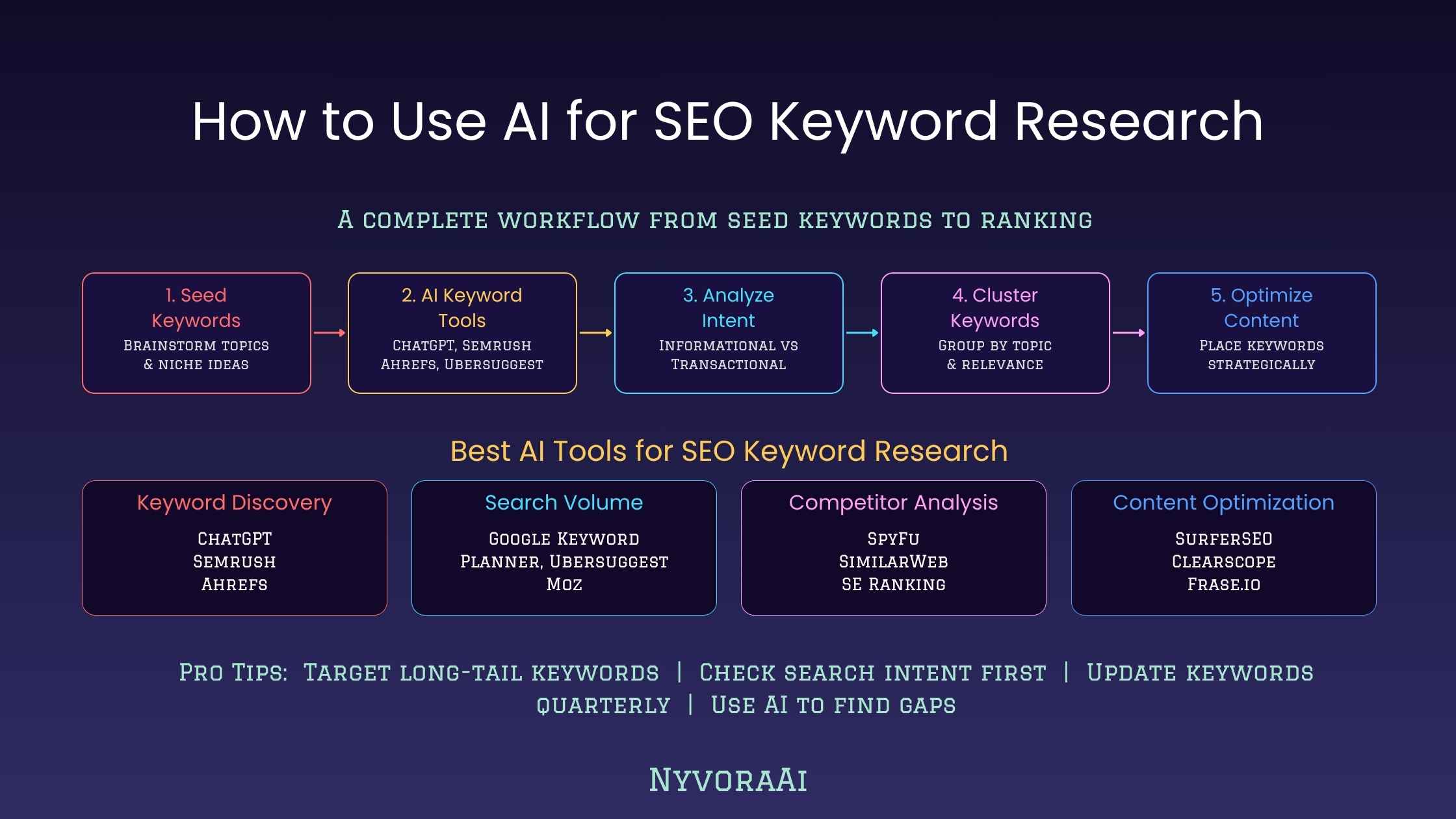
Let me be upfront about something before we go any further. AI does not replace a proper keyword tool. You still need volume data, difficulty scores, and real SERP information — and those things come from Ahrefs, Semrush, Google Search Console, or similar platforms. What AI does is dramatically accelerate every stage that happens before and around those tools: generating ideas, clustering topics, figuring out search intent, spotting angles competitors have missed, and turning a thin seed keyword into a content plan that actually makes sense.
So the honest answer to "how to use AI for SEO keyword research" is: use it as the thinking partner sitting alongside your keyword tool, not as a replacement for it. That reframe alone will save you from a lot of frustration. And if you want to understand the prompting side of this more deeply before diving in, our guide on how to write better prompts for AI tools is worth reading first — the quality of your keyword research output depends heavily on prompt quality.
- AI is for speed and ideation — volume and difficulty data still need a dedicated SEO tool to confirm.
- Prompt quality matters enormously — vague inputs produce generic keyword lists that look the same as everyone else's.
- Intent classification is where AI genuinely shines — it can sort and label large lists far faster than doing it manually.
- Content gap discovery is underused — asking AI to think like a frustrated searcher reveals angles keyword tools often miss.
- Always validate before you publish — AI suggests, data confirms.
01What AI Actually Does in Keyword Research
Before getting into the workflow, it helps to be clear on what you're actually asking AI to do. A language model does not have access to live search data. It's not crawling Google to see what's ranking. What it does have is a very deep, pattern-based understanding of how topics relate to each other — built from processing enormous amounts of content about language, search behaviour, marketing, and pretty much every industry under the sun.
That makes it genuinely good at a specific set of keyword tasks. It can expand a seed idea into related sub-topics you probably didn't think of. It can cluster a messy keyword list into logical groups. It can look at a phrase and tell you whether the person searching it is probably researching, comparing, or ready to buy. And it can think through what questions a frustrated user might type into Google that a well-funded competitor brand hasn't bothered to answer yet.
None of that requires live data. It requires pattern recognition and reasoning — which is exactly what language models are built for. Think of it as having a research assistant who reads extremely fast and never gets bored of sorting spreadsheets. The limitation is that they can't check today's traffic numbers for you. You have to do that part yourself.
02Step-by-Step AI Keyword Research Workflow
Here's a repeatable process you can actually use on your next content project:
Start with a specific seed, not a generic one
Instead of prompting AI with "give me keywords about personal finance," give it context: your niche, your audience, your existing content, and what you're actually trying to rank for. The more specific your seed, the less generic your output.
Generate a broad topic cluster first
Ask AI to map out the main subtopics under your seed keyword before generating keyword phrases. This gives you a content architecture before you get lost in individual keyword ideas.
Go long-tail and question-based
Ask specifically for long-tail variations, question phrases people actually type, and "how do I" style queries. These tend to have lower difficulty and higher conversion intent than broad head terms.
Get AI to classify intent for each keyword
Paste your rough list back into AI and ask it to label each keyword as informational, navigational, commercial, or transactional. This step alone saves hours on large lists.
Validate with a real SEO tool
Take the strongest ideas into Ahrefs, Semrush, Ubersuggest, or Google Search Console. Check actual search volume and keyword difficulty before committing to any content brief. AI suggested — data confirmed.
Turn confirmed keywords into a content brief
Once you know what's worth targeting, ask AI to draft a content brief: target keyword, intent, recommended structure, related subtopics to cover, and questions to answer. This feeds directly into your writing workflow.
If you're already using AI to produce the content itself after the research stage, our guide on how to use AI to write blog posts faster covers exactly that next step — treating keyword research and content creation as one connected AI-assisted flow.
03Prompts That Actually Work
This is the part most guides skip. They tell you "use AI for keyword research" without showing you what to actually type. Here are real prompt patterns — with a weak version and a better version side by side.
Notice the difference. The better prompt tells the model who the audience is, what stage of the journey they're at, and what format of content you need keywords for. That context is what prevents AI from giving you a list of obvious, obvious keywords that every fitness blog on the internet already targets.
The "think like a frustrated searcher" instruction is one of the most useful techniques in AI keyword research. It forces the model to reason about what people need but can't find — which is exactly what a content gap opportunity looks like.
Save Your Best Prompts as Templates
Once you find a prompt structure that produces good keyword ideas for your niche, save it as a reusable template. Swap out the topic, audience, and competitor names each time. You'll get consistently better output than starting fresh every session.
04Interactive: Classify Search Intent Like AI Does
Search intent is genuinely one of the biggest ranking factors, and AI is faster at classifying it than any manual process. Click each keyword below to see how intent gets identified — and why it matters for which type of content you'd create.
Live Intent Classifier
Click any keyword to see its intent type, what the searcher actually wants, and what content format would match it
05AI vs. Traditional Keyword Tools: What Each Is Actually Good For
There's a false choice floating around online: "AI vs keyword tools." In practice, they do completely different things. Understanding the distinction properly will save you from either dismissing AI entirely or trusting it for things it genuinely can't do.
| Task | AI Chatbot | Keyword Tool |
|---|---|---|
| Brainstorm keyword ideas from a seed | ✅ Excellent — fast, creative, niche-aware | ✅ Good — data-backed but often obvious |
| Monthly search volume | ❌ Cannot provide this | ✅ Core function |
| Keyword difficulty / competition | ❌ Cannot provide this | ✅ Core function |
| Search intent classification | ✅ Very good at scale | ⚠️ Basic, often only one label |
| Topic clustering | ✅ Excellent — understands semantic meaning | ⚠️ Limited; usually alphabetical grouping |
| Content gap analysis | ✅ Strong with the right prompt | ⚠️ Shows competitor keywords, not missed angles |
| SERP analysis | ❌ No real-time SERP access | ✅ Full SERP data available |
| Content brief generation | ✅ Strong when given keyword context | ❌ Not designed for this |
The practical takeaway: use AI for the creative, structural, and intent-based work. Use your keyword tool for the numbers. Then combine the two in your content brief before you write anything.
06Using AI to Find Content Gaps Competitors Missed
This is honestly one of the most underused things you can do with AI in an SEO workflow. Traditional keyword tools show you what your competitors are ranking for. That's useful — but it's also widely available to everyone, which means everybody is chasing the same list. AI lets you approach the problem differently: not "what is already ranking" but "what should exist but doesn't."
There's a useful framing for this. Ask AI to think like a real person who has searched for something in your niche, found a dozen mediocre articles, and is still frustrated because none of them actually answered their specific question. What did they search? What did they not find? That's your content gap.
The "Frustrated Searcher" Prompt
Ask AI to role-play as someone who searched your topic repeatedly and never found a satisfying answer. What questions were left unanswered? What frustration would they express?
The "Forum Thread" Prompt
Ask AI to imagine what questions real users post in Reddit, Quora, or niche forums around your topic. These conversational queries often surface long-tail ideas that keyword tools miss.
The "Before and After" Prompt
Ask AI what people need to understand before they can use your main target keyword effectively, and what they need to know after. This maps out supporting content that strengthens your cluster.
Once you've built out a topic cluster using these approaches, you're essentially creating a small content hub around a subject — which Google rewards with stronger topical authority over time. If you want to take this further into a full content workflow, our breakdown of how to build a daily workflow using AI tools shows how to wire these research steps into your regular publishing routine. And once content is published, making sure AI-generated content is accurate matters too — our piece on how to fact-check AI-generated content is worth bookmarking for that stage.
07Common Mistakes to Avoid
A few things go wrong fairly consistently when people first start using AI for keyword research:
Trusting AI Volume Guesses
If an AI mentions a keyword "has high search volume," that's a guess based on its training data, not live data. Always validate in a real tool before building content around a keyword.
Using Generic Prompts
"Give me SEO keywords for my blog" produces exactly the kind of obvious list every other beginner is also getting. Specificity in your prompt is the single biggest lever for output quality.
Skipping the Validation Step
AI can invent plausible-sounding keyword phrases that nobody actually searches. Run everything through a keyword tool before building a content calendar around AI-generated ideas.
Ignoring Local & Niche Context
A generic AI prompt will return generic global keywords. If you're targeting a specific city, language, or niche audience, say so explicitly in the prompt every single time.
One-and-Done Research
Keyword research isn't a one-time event. Search trends shift, new questions emerge, and competitors publish new content constantly. Use AI to run a fresh cluster review every quarter.
Not Connecting to a Content Plan
A list of keywords with no plan attached is just a list. Always ask AI to help you turn confirmed keywords into a prioritised content calendar with recommended formats and target intent.
If your workflow extends to social content after the blog publishing stage, these keyword research habits apply there too. Our step-by-step guide on using AI for social media shows how the same topic clusters you build for SEO can feed your social content calendar at the same time. And if you're doing any of this as a freelancer, the keyword research skills here translate directly — our article on how to use AI for freelance writing jobs goes into the practical business side of it.
08Frequently Asked Questions
How to use AI for SEO keyword research?
Can AI replace traditional keyword research tools?
What is the best AI prompt for keyword research?
Is AI keyword research good for beginners?
How do I check if AI-suggested keywords are worth targeting?
Can I use free AI tools for keyword research?
What is search intent and why does it matter for keyword research?
AI keyword research won't write your content strategy for you — and honestly, you wouldn't want it to. The value is in the hours it saves on the repetitive parts: expanding seed ideas, sorting intent, mapping out topic clusters, and spotting the angles that nobody else in your space has written about yet. Keep a real keyword tool in the loop for the numbers, use AI for the thinking, and you'll end up with a more interesting content plan in a fraction of the time it used to take. That combination is the actual unlock here — not one tool or the other, but both doing the jobs they're actually good at.

Written by Varun Lalwani
Varun writes practical guides on using AI inside real content and SEO workflows — the kind of thing that actually changes how you work day-to-day. Questions? Reach out here.